> ## Documentation Index
> Fetch the complete documentation index at: https://docs.fedapay.com/llms.txt
> Use this file to discover all available pages before exploring further.
# FedaPay Account Types
FedaPay provides several types of accounts tailored to the specific needs of each user. Whether you are a **company**, an **independent worker**, an **NGO**, a **government institution**, operate a **marketplace**, or are a **physical merchant**, FedaPay offers a tailored solution to collect payments simply and securely. Below is an overview of the available options:
## NGO Account
**Who is it for?**
This account is designed for Non-Governmental Organizations (NGOs) and non-profit associations.
**Why choose this account?**
* No limit on transaction amounts, either per transaction or per week.
* Adapted to the specific needs of humanitarian and non-profit organizations.
**Required documents (KYB):**
* NGO/association registration number.
* Official NGO/association declaration receipt.
* Name of the NGO/association manager.
* ID document of the Founder / Manager / Director.
* Copy of the Founder / Manager / Director’s ID document.
## Independent Worker Account
**Who is it for?**
If you are a freelancer or service provider and want to receive payments easily, this account is for you.
**Key features:**
* Limit of **10 transactions per week**.
* Authorized amount per transaction: between **100 XOF and 300,000 XOF**.
**Required documents (KYC):**
* ID document of the Founder / Manager / Director.
* Copy of the ID document.
* IFU number (Unique Tax Identification Number).
* Supporting IFU document.
## Business Account
**Who is it for?**
Legally registered companies that wish to integrate online payments and manage their cash flow efficiently.
**Why choose this account?**
* Access to **all payment methods** available on FedaPay.
* **No limit** on transaction amounts.
**Required documents (KYB):**
* RCCM or company registration number.
* Official RCCM document or proof of registration.
* Name of the company manager.
* ID document of the Founder / Manager / Director.
* Copy of the ID document.
* IFU number.
* Supporting IFU document.
## Government Account
**Who is it for?**
This account is intended for government institutions and administrative entities.
**Why choose this account?**
* No transaction limits.
* Adapted to public financial operations.
**Required documents:**
Validation by the FedaPay team.
## TAP & GO Account
**Who is it for?**
Merchants using the TAP & GO solution to accept in-store or on-site payments.
**Conditions**
* Acceptance of in-person payments (in-store payments).
* No limit on the number or amount of transactions.
* Possibility to manage sub-accounts and commissions depending on the profile.
**Required documents (Digital KYC)**
* RCCM or company registration number (Not mandatory).
* Official RCCM document or proof of registration (if available).
* CIP of the Founder / Manager / Director.
* Supporting CIP document.
* IFU number.
* Supporting IFU document.
* Name of the company manager.
## Marketplace Account
**Who is it for?**
This account is specifically designed for **marketplace** platforms that connect sellers and buyers and wish to automate payment and commission management.
**Why choose this account?**
* Accepts **all payment methods** (Mobile Money, bank cards, etc.).
* **No limit** on the number and amount of transactions.
* Advanced feature: **sub-account and commission management.**
**Required documents (KYC):**
* RCCM or company registration number.
* Official RCCM document or proof of registration.
* Name of the company manager.
* ID document of the Founder / Manager / Director.
* Copy of the ID document.
* IFU number.
* Supporting IFU document.
**Sub-Account Feature**
With a **Marketplace Account**, you can integrate sub-accounts, allowing automatic payment distribution among multiple parties.
**Use Case Example :**
A marketplace connects multiple vendors. When a customer makes a purchase, a commission is deducted for the platform, and the remaining payment is automatically transferred to the relevant vendor.
**Conditions to activate sub-accounts :**
* A validated Marketplace Account.
* At least one associated sub-account.
**How Does Payment Distribution Work ?**
When you create a transaction on your **marketplace**, you can specify how the amount should be divided between the **main account and service providers**.
**Example of an API request for commission distribution :**
```java Curl theme={null}
//Replace YOUR_SECRET_API_KEY with the secret API key of your sandbox or live account. If you are using your live account, you must replace the link with https://api.fedapay.com/v1/transactions
curl -X POST \
https://sandbox-api.fedapay.com/v1/transactions \
-H 'Authorization: Bearer YOUR_SECRET_API_KEY' \
-H 'Content-Type: application/json' \
-d '{
"description" : "Transaction for john.doe@example.com",
"amount" : 2000,
"currency" : {"iso" : "XOF"},
"callback_url" : "https://maplateforme.com/callback",
"customer" : {
"firstname" : "John",
"lastname" : "Doe",
"email" : "john.doe@example.com",
"phone_number" : {
"number" : "+22997808080",
"country" : "bj"
}
},
"sub_accounts_commisssions": [
{
"reference": "acc_xxxxxxxxx",
"amount": 1500
}
]
}'
```
```javascript NodeJs theme={null}
const { FedaPay, Transaction } = require('fedapay')
/* Replace YOUR_API_KEY with your actual API key */
FedaPay.setApiKey("VOTRE_CLE_API_SECRETE");
/* Specify whether you want to run your query in test or live mode */
FedaPay.setEnvironment('sandbox'); //ou setEnvironment('live');
/* Create the transaction */
const transaction = await Transaction.create({
description: 'Description',
amount: 2000,
callback_url: 'https://maplateforme.com/callback',
currency: {
iso: 'XOF'
},
customer: {
firstname: 'John',
lastname: 'Doe',
email: 'john.doe@example.com',
phone_number: {
number: '97808080',
country: 'BJ'
}
},
sub_accounts_commisssions: [
{
reference: 'acc_xxxxxxxxx',
amount: 1500
}
]
});
```
```php PHP theme={null}
/* Replace YOUR_API_KEY with your actual API key */
\FedaPay\FedaPay::setApiKey("YOUR_API_KEY");
/* Specify whether you want to run your query in test or live mode */
\FedaPay\FedaPay::setEnvironment('sandbox'); //ou setEnvironment('live');
/* Create the transaction */
\FedaPay\Transaction::create(array(
"description" => "Transaction for john.doe@example.com",
"amount" => 2000,
"currency" => ["iso" => "XOF"],
"callback_url" => "https://maplateforme.com/callback",
"customer" => [
"firstname" => "John",
"lastname" => "Doe",
"email" => "john.doe@example.com",
"phone_number" => [
"number" => "+22997808080",
"country" => "bj"
]
],
"sub_accounts_commisssions" => [
[
"reference" => "acc_xxxxxxxxx",
"amount" => 1500
]
]
));
```
In this example, **1,500 XOF** will be transferred to the sub-account of the service provider **(acc\_xxxxxxxxx)**, while the main account **retains the remaining amount** after deducting FedaPay fees.
**Note:** The total distributed amount must be less than the transaction amount minus FedaPay commissions; otherwise, the transaction will fail.
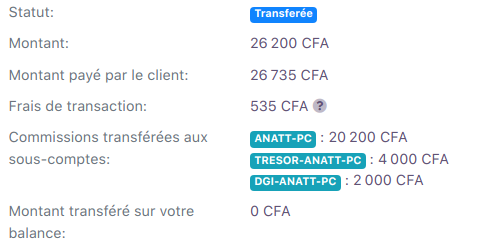
**Track Transactions & Commissions**
From your FedaPay **dashboard**, you can monitor all transactions with commission distribution by viewing their details.
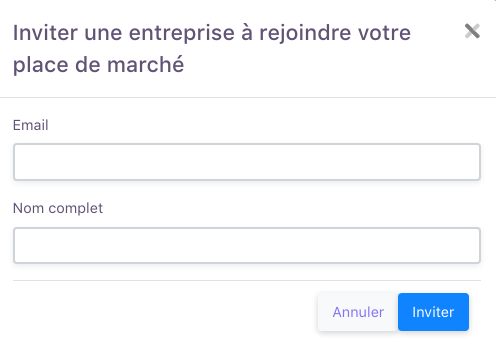
 **Invite a Provider to Join Your Marketplace**
You can invite a service provider to join your **FedaPay Marketplace** account directly from your dashboard.
**Steps to invite a business :**
**Invite a Provider to Join Your Marketplace**
You can invite a service provider to join your **FedaPay Marketplace** account directly from your dashboard.
**Steps to invite a business :**

 **Automate Sub-Account Creation via API**
FedaPay allows you to automate the onboarding of new providers by integrating the sub-account functionality directly into your system via API.
**Example code snippet for automating sub-account creation:**
```java Curl theme={null}
//Replace YOUR_SECRET_API_KEY with the secret API key of your sandbox or live account. If you are using your live account, you must replace the link with https://api.fedapay.com/v1/auth/sub_account_invitations
curl -X POST \
https://sandbox-api.fedapay.com/v1/auth/sub_account_invitations \
-H 'Authorization: Bearer YOUR_SECRET_API_KEY' \
-H 'Content-Type: application/json' \
-d '{
"email" : "john.doe@example.com",
"full_name" : "Jonh Doe"
}'
```
FedaPay ensures the verification and validation of the information to comply with KYC regulations.
## Mandatory Contractual Documents
For all applicable account types (NGO, Independent Worker, Business, Marketplace), the following contractual documents are required:
* Declaration of honor
* Terms and Conditions of Use
* Service Agreement with FedaPay
These documents are available for download on the platform. They must be:
* downloaded;
* signed;
* scanned;
* uploaded in the designated fields.
**TAP & GO Specificity**
For TAP & GO, the contractual documents are completed and physically signed on-site during the onboarding process.
## Upgrading from an Individual Account to a Business Account on FedaPay
If you have a **Freelancer Account** (individual account), you can convert it into a **Business Account** by following these steps:
* Log in to your **FedaPay** account.
* Go to your account settings.
* Click on the **Upgrade to Business** button.
* An interface will appear with the list of documents required to validate your Business Account.
* Make sure you have all the necessary documents before proceeding.
* Click on **Yes, I want to upgrade to Business.**
* Fill out the application form by entering the required information.
* Ensure that all the entered information is correct.
* Upload the required documents.
* Click on **Submit** to send your request.
## Mandatory Tax Information for FedaPay Accounts
When creating or updating a **FedaPay account** (Freelancer, Business, or Marketplace), it is essential to provide **accurate tax information**, based on your country of operation. This data is required for proper legal identification and regulatory compliance.
**Required Tax Identifiers by Country**
**IFU** (Unique Tax Identification Number)
**IFU/NINEA** (National Business and Association ID Number)
**Unique Financial Identifier**
**IDU/NIF** (Unique Identifier / Tax Identification Number)
**NIF** (Tax Identification Number)
**NIF** (Tax Identification Number)
**NIF** (Tax Identification Number)
**NIF** (Tax Identification Number)
**Make sure the submitted tax document is valid and matches the exact legal name of the entity.**
**Automate Sub-Account Creation via API**
FedaPay allows you to automate the onboarding of new providers by integrating the sub-account functionality directly into your system via API.
**Example code snippet for automating sub-account creation:**
```java Curl theme={null}
//Replace YOUR_SECRET_API_KEY with the secret API key of your sandbox or live account. If you are using your live account, you must replace the link with https://api.fedapay.com/v1/auth/sub_account_invitations
curl -X POST \
https://sandbox-api.fedapay.com/v1/auth/sub_account_invitations \
-H 'Authorization: Bearer YOUR_SECRET_API_KEY' \
-H 'Content-Type: application/json' \
-d '{
"email" : "john.doe@example.com",
"full_name" : "Jonh Doe"
}'
```
FedaPay ensures the verification and validation of the information to comply with KYC regulations.
## Mandatory Contractual Documents
For all applicable account types (NGO, Independent Worker, Business, Marketplace), the following contractual documents are required:
* Declaration of honor
* Terms and Conditions of Use
* Service Agreement with FedaPay
These documents are available for download on the platform. They must be:
* downloaded;
* signed;
* scanned;
* uploaded in the designated fields.
**TAP & GO Specificity**
For TAP & GO, the contractual documents are completed and physically signed on-site during the onboarding process.
## Upgrading from an Individual Account to a Business Account on FedaPay
If you have a **Freelancer Account** (individual account), you can convert it into a **Business Account** by following these steps:
* Log in to your **FedaPay** account.
* Go to your account settings.
* Click on the **Upgrade to Business** button.
* An interface will appear with the list of documents required to validate your Business Account.
* Make sure you have all the necessary documents before proceeding.
* Click on **Yes, I want to upgrade to Business.**
* Fill out the application form by entering the required information.
* Ensure that all the entered information is correct.
* Upload the required documents.
* Click on **Submit** to send your request.
## Mandatory Tax Information for FedaPay Accounts
When creating or updating a **FedaPay account** (Freelancer, Business, or Marketplace), it is essential to provide **accurate tax information**, based on your country of operation. This data is required for proper legal identification and regulatory compliance.
**Required Tax Identifiers by Country**
**IFU** (Unique Tax Identification Number)
**IFU/NINEA** (National Business and Association ID Number)
**Unique Financial Identifier**
**IDU/NIF** (Unique Identifier / Tax Identification Number)
**NIF** (Tax Identification Number)
**NIF** (Tax Identification Number)
**NIF** (Tax Identification Number)
**NIF** (Tax Identification Number)
**Make sure the submitted tax document is valid and matches the exact legal name of the entity.**