> ## Documentation Index
> Fetch the complete documentation index at: https://docs.fedapay.com/llms.txt
> Use this file to discover all available pages before exploring further.
# Webhooks and Events
## Event Management
Events are important actions that occur within your FedaPay account, such as the creation of a transaction or an update to a customer. Understanding how these events work allows you to better manage your transactions and provide a better experience for your customers.
Whenever an event occurs, FedaPay notifies you in real-time through **event notifications**. These notifications can be used to track and react to what is happening within your account, such as when a payment is approved or when a customer is updated.
#### Transaction Lifecycle
Transactions on FedaPay follow a lifecycle, and each stage in this lifecycle generates a specific event. Here's how it works:
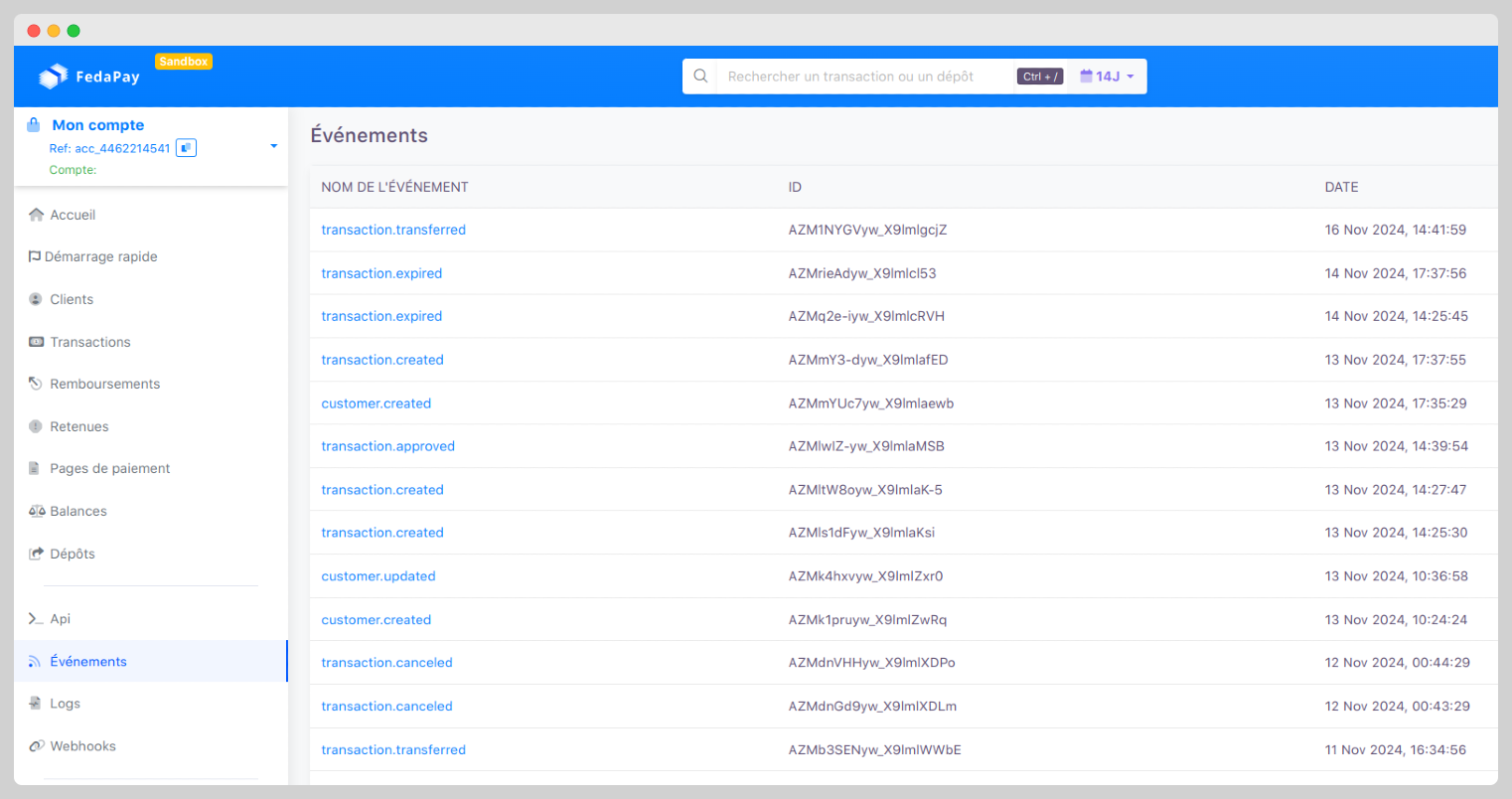
1. **Transaction Creation** : Once the customer is created, you can assign a transaction to them. This triggers the **transaction.created** event.
2. **Tracking Transactions**: A transaction can evolve in several ways:
* **transaction.approved** : The transaction has been approved, meaning the payment has been validated.
* **customer.created** : When a new customer is added to your account, this generates the event
* **transaction.declined**: The payment failed or was rejected.
* **transaction.canceled**: The transaction was canceled before it was finalized.
* **transaction.transferred**: The funds from the transaction have been transferred to the designated account (e.g., bank account or mobile money).
3. À chaque changement de statut, un nouvel événement est généré pour vous tenir informé. Par exemple, dès qu'une transaction est mise à jour, l’événement **transaction.updated** est déclenché.
#### Customer Lifecycle
Customers can also have specific events:
* **customer.updated** : The customer’s profile has been modified (e.g., their name or email address).
* **customer.deleted** : The customer has been deleted from your account.
#### How to Use Events ?
Each event contains detailed information about what has just happened. You can view all these events in the **Events** section of your FedaPay dashboard, which gives you a complete history of all important actions in your account.
#### Why is it Important ?
Event management helps you to:
* **Track Payments**: You are informed in real-time of the status of each transaction.
* **Manage Customers**: You can track changes made to customer profiles.
* **Automate Processes**: With event notifications, you can automate certain tasks on your site, like sending a confirmation email after a successful payment.
# Introduction to Webhooks
**Webhooks** are automatic notifications that FedaPay sends to your application or website when important events occur on your account. For example, you can receive a webhook when a transaction is successful or disputed.
These notifications are particularly useful because they allow you to stay informed in real-time without having to manually check what is happening on your FedaPay account.
#### Why Use Webhooks ?
Webhooks are essential to be quickly alerted of important actions on your account, such as:
* Successful or failed payments.
* Refunds.
* Disputed transactions.
#### How Do Webhooks Work?
Each time an event occurs (e.g., an accepted payment), FedaPay creates an **Event object**. This object contains all relevant information about the event, such as the event type (successful payment) and associated details.
Then, FedaPay sends this object to your chosen URL (called the **endpoint**) via an HTTP request. It is like FedaPay sending you a message to inform you of what has happened.
## Configuring Webhooks
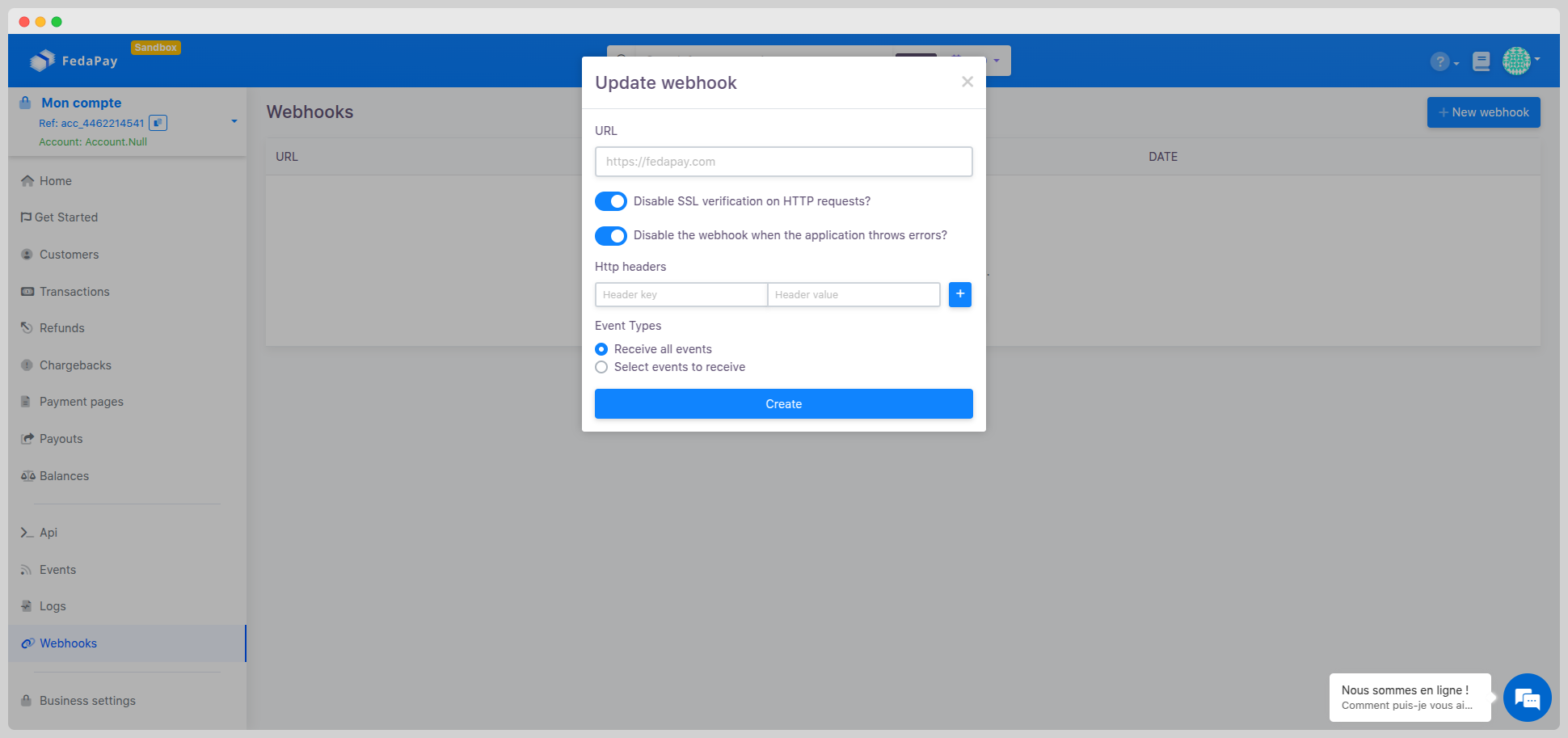
To receive Webhooks, you need to configure a URL on your site that can receive these notifications. Follow these steps:
* Log in to your **FedaPay** account.
* Go to the **Webhooks** section from the dashboard menu.
* Click on **Create a Webhook** or **New Webhook**.
* A form opens with several fields to fill in:
 **Enter the destination URL**
* Enter the URL of your site where you want to receive notifications.
* Ensure that this URL is ready to handle Webhooks sent by FedaPay.
**Optional settings:**
* **Disable SSL verification on HTTP requests** (optional).
* **Disable the Webhook when the application generates errors** (optional).
**Add HTTP headers**
* You can specify custom headers by adding **key-value** pairs.
* Click the **"+"** button to add multiple headers if needed.
**Select event types**
* **Receive all events** (by default, you will receive all notifications).
* **Select specific events** (you can choose only those of interest from the available event list).
**Finalization and activation**
* Verify that all information is correct.
* Click **Create** to save and activate the Webhook.
Once your Webhooks are created, you can:
* **Modify**: Change the URL or the events you want to track.
* **Delete**: If you no longer need this Webhook, you can remove it.
* **View details**: You can see all information about the Webhook (URL, tracked events, etc.).
## Webhook Event Delivery Strategy
When you define a Webhook endpoint, FedaPay will send event notifications related to that endpoint when they are triggered on FedaPay.
* FedaPay sends an **HTTP POST request** with the event data.
* FedaPay expects a **2xx status** response.
* Any response other than **2xx** is considered a failure.
#### Automatic Retry Mechanism
FedaPay executes each webhook event delivery in concurrent tasks.
* If execution fails, FedaPay will **retry up to 9 times** at exponential intervals.
* The retry waiting time does not exceed **2 minutes**.
* After **10 unsuccessful attempts**, the Webhook is automatically disabled to prevent queue overload.
* You can prevent automatic deactivation by unchecking the option **Disable the webhook when the application generates errors** in your dashboard.
It is advisable to **monitor your system closely** and prevent potential errors. Follow our recommendations for optimal service implementation.
#### Manual Redelivery
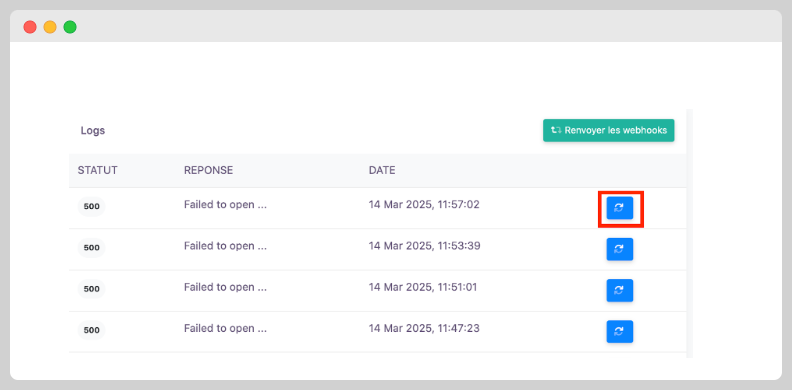
* Go to the **Logs** page of your webhook.
* Click the **Redeliver** button.
**Enter the destination URL**
* Enter the URL of your site where you want to receive notifications.
* Ensure that this URL is ready to handle Webhooks sent by FedaPay.
**Optional settings:**
* **Disable SSL verification on HTTP requests** (optional).
* **Disable the Webhook when the application generates errors** (optional).
**Add HTTP headers**
* You can specify custom headers by adding **key-value** pairs.
* Click the **"+"** button to add multiple headers if needed.
**Select event types**
* **Receive all events** (by default, you will receive all notifications).
* **Select specific events** (you can choose only those of interest from the available event list).
**Finalization and activation**
* Verify that all information is correct.
* Click **Create** to save and activate the Webhook.
Once your Webhooks are created, you can:
* **Modify**: Change the URL or the events you want to track.
* **Delete**: If you no longer need this Webhook, you can remove it.
* **View details**: You can see all information about the Webhook (URL, tracked events, etc.).
## Webhook Event Delivery Strategy
When you define a Webhook endpoint, FedaPay will send event notifications related to that endpoint when they are triggered on FedaPay.
* FedaPay sends an **HTTP POST request** with the event data.
* FedaPay expects a **2xx status** response.
* Any response other than **2xx** is considered a failure.
#### Automatic Retry Mechanism
FedaPay executes each webhook event delivery in concurrent tasks.
* If execution fails, FedaPay will **retry up to 9 times** at exponential intervals.
* The retry waiting time does not exceed **2 minutes**.
* After **10 unsuccessful attempts**, the Webhook is automatically disabled to prevent queue overload.
* You can prevent automatic deactivation by unchecking the option **Disable the webhook when the application generates errors** in your dashboard.
It is advisable to **monitor your system closely** and prevent potential errors. Follow our recommendations for optimal service implementation.
#### Manual Redelivery
* Go to the **Logs** page of your webhook.
* Click the **Redeliver** button.
 ## Best Practices for Using Webhooks
#### Handle Duplicate Events
Webhook endpoints may sometimes receive the same event multiple times. You can prevent processing duplicate events by following these guidelines:
* Store the **event IDs** of already processed events to avoid reprocessing them.
* Use the object **identifier** in **object** and **name** to detect duplicates.
#### Listen Only to Required Event Types
* Configure your endpoints to receive only necessary events.
* Avoid listening to **all events** to prevent server overload.
* Modify received events through the dashboard.
#### Handle Events Asynchronously
To prevent scalability issues and ensure system stability, follow these recommendations:
* Use an **asynchronous queue** to process webhook events without blocking your system.
* Avoid **synchronous processing**, which may slow down your infrastructure and cause failures under heavy load.
* Anticipate **traffic spikes**, especially during mass subscription renewals, to prevent server overload.
* Control processing rates by adjusting event consumption based on your system's capacity.
#### Receiving Events with an HTTPS Server
To ensure webhook security, make sure your server meets the following requirements:
* **Use an HTTPS URL**: FedaPay verifies the security of the connection before sending webhooks.
* **Valid SSL certificate**: Your server must be properly configured with a valid certificate to prevent connection rejection.
* **TLS compatibility**: Only **TLS v1.2 and v1.3** versions are supported by FedaPay.
#### Verifying That Events Are Sent by FedaPay
* FedaPay sends webhooks from a predefined **list of IP addresses**.
* Only trust events originating from these addresses.
* Each webhook is signed by FedaPay via the **X-FEDAPAY-SIGNATURE** header.
* You can verify these signatures using:
* Official **FedaPay libraries**.
* Manual verification with your own solution.
**Retrieve the Endpoint Secret**
* Go to **Workbench → Webhooks Tab**.
* Select the endpoint and click **Click to reveal**.
* FedaPay generates a unique secret key for each endpoint:
* **Different between test mode and live mode.**
* **Unique for each used endpoint.**
**Signature Verification**
* When a Webhook is sent, FedaPay includes a signature in the request header.
* This signature is present in the **X-FEDAPAY-SIGNATURE** header.
* PTo verify that the message is authentic:
1- Use your Webhook **secret key** (retrievable from dashboard settings).
2- Use this key to verify the signature and ensure the Webhook is from **FedaPay**.
**Tools for Signature Verification**
* To ensure that received Webhooks originate from FedaPay and have not been altered, it is essential to verify their signature.
* FedaPay simplifies this process with its **official libraries**.
* Here is an example of code showing how to verify the signature in a **Node.js** or **PHP**
```javascript NodeJs theme={null}
const { Webhook } = require('fedapay')
// You can find your endpoint's secret key in your webhook settings
const endpointSecret = 'wh_sandbox...';
// This example uses Express to receive webhooks
const app = require('express')();
// Use body-parser to retrieve the raw body as a buffer
const bodyParser = require('body-parser');
// Match the raw body to content type application/json
app.post('/webhook', bodyParser.raw({type: 'application/json'}), (request, response) => {
const sig = request.headers['x-fedapay-signature'];
let event;
try {
event = Webhook.constructEvent(request.body, sig, endpointSecret);
} catch (err) {
response.status(400).send(`Webhook Error: ${err.message}`);
}
// Handle the event
switch (event.name) {
case 'transaction.created':
// Transaction créée
break;
case 'transaction.approved'':
// Transaction approuvée
break;
case 'transaction.canceled'':
// Transaction annulée
break;
default:
console.log(`Unhandled event type ${event.type}`);
}
// Return a response to acknowledge receipt of the event
response.json({received: true});
});
app.listen(4242, () => console.log('Running on port 4242'));
```
```php PHP theme={null}
// You can find your endpoint's secret key in your webhook settings
$endpoint_secret = 'wh_dev.......';
$payload = @file_get_contents('php://input');
$sig_header = $_SERVER['HTTP_X_FEDAPAY_SIGNATURE'];
$event = null;
try {
$event = \FedaPay\Webhook::constructEvent(
$payload, $sig_header, $endpoint_secret
);
} catch(\UnexpectedValueException $e) {
// Invalid payload
http_response_code(400);
exit();
} catch(\FedaPay\Error\SignatureVerification $e) {
// Invalid signature
http_response_code(400);
exit();
}
// Handle the event
switch ($event->name) {
case 'transaction.created':
// Transaction créée
break;
case 'transaction.approved':
// Transaction approuvée
break;
case 'transaction.canceled':
// Transaction annulée
break;
default:
http_response_code(400);
exit();
}
http_response_code(200);
```
* A **replay attack** consists of resending an intercepted webhook.
* FedaPay includes a **timestamp** in the **X-FEDAPAY-SIGNATURE** header to prevent these attacks.
* The timestamp is checked with the signature:
* **It cannot be modified** without invalidating the signature.
* If the timestamp is too old, your application can **reject the webhook**.
* Each retry attempt (if the first one fails) generates a **new signature and timestamp**.
* Your endpoint should respond **quickly** with a **2xx status** before performing heavy processing.
* Exemples :
* **Respond with 200 immediately.**
* **Then, perform actions such as marking an invoice as paid.**
## Best Practices for Using Webhooks
#### Handle Duplicate Events
Webhook endpoints may sometimes receive the same event multiple times. You can prevent processing duplicate events by following these guidelines:
* Store the **event IDs** of already processed events to avoid reprocessing them.
* Use the object **identifier** in **object** and **name** to detect duplicates.
#### Listen Only to Required Event Types
* Configure your endpoints to receive only necessary events.
* Avoid listening to **all events** to prevent server overload.
* Modify received events through the dashboard.
#### Handle Events Asynchronously
To prevent scalability issues and ensure system stability, follow these recommendations:
* Use an **asynchronous queue** to process webhook events without blocking your system.
* Avoid **synchronous processing**, which may slow down your infrastructure and cause failures under heavy load.
* Anticipate **traffic spikes**, especially during mass subscription renewals, to prevent server overload.
* Control processing rates by adjusting event consumption based on your system's capacity.
#### Receiving Events with an HTTPS Server
To ensure webhook security, make sure your server meets the following requirements:
* **Use an HTTPS URL**: FedaPay verifies the security of the connection before sending webhooks.
* **Valid SSL certificate**: Your server must be properly configured with a valid certificate to prevent connection rejection.
* **TLS compatibility**: Only **TLS v1.2 and v1.3** versions are supported by FedaPay.
#### Verifying That Events Are Sent by FedaPay
* FedaPay sends webhooks from a predefined **list of IP addresses**.
* Only trust events originating from these addresses.
* Each webhook is signed by FedaPay via the **X-FEDAPAY-SIGNATURE** header.
* You can verify these signatures using:
* Official **FedaPay libraries**.
* Manual verification with your own solution.
**Retrieve the Endpoint Secret**
* Go to **Workbench → Webhooks Tab**.
* Select the endpoint and click **Click to reveal**.
* FedaPay generates a unique secret key for each endpoint:
* **Different between test mode and live mode.**
* **Unique for each used endpoint.**
**Signature Verification**
* When a Webhook is sent, FedaPay includes a signature in the request header.
* This signature is present in the **X-FEDAPAY-SIGNATURE** header.
* PTo verify that the message is authentic:
1- Use your Webhook **secret key** (retrievable from dashboard settings).
2- Use this key to verify the signature and ensure the Webhook is from **FedaPay**.
**Tools for Signature Verification**
* To ensure that received Webhooks originate from FedaPay and have not been altered, it is essential to verify their signature.
* FedaPay simplifies this process with its **official libraries**.
* Here is an example of code showing how to verify the signature in a **Node.js** or **PHP**
```javascript NodeJs theme={null}
const { Webhook } = require('fedapay')
// You can find your endpoint's secret key in your webhook settings
const endpointSecret = 'wh_sandbox...';
// This example uses Express to receive webhooks
const app = require('express')();
// Use body-parser to retrieve the raw body as a buffer
const bodyParser = require('body-parser');
// Match the raw body to content type application/json
app.post('/webhook', bodyParser.raw({type: 'application/json'}), (request, response) => {
const sig = request.headers['x-fedapay-signature'];
let event;
try {
event = Webhook.constructEvent(request.body, sig, endpointSecret);
} catch (err) {
response.status(400).send(`Webhook Error: ${err.message}`);
}
// Handle the event
switch (event.name) {
case 'transaction.created':
// Transaction créée
break;
case 'transaction.approved'':
// Transaction approuvée
break;
case 'transaction.canceled'':
// Transaction annulée
break;
default:
console.log(`Unhandled event type ${event.type}`);
}
// Return a response to acknowledge receipt of the event
response.json({received: true});
});
app.listen(4242, () => console.log('Running on port 4242'));
```
```php PHP theme={null}
// You can find your endpoint's secret key in your webhook settings
$endpoint_secret = 'wh_dev.......';
$payload = @file_get_contents('php://input');
$sig_header = $_SERVER['HTTP_X_FEDAPAY_SIGNATURE'];
$event = null;
try {
$event = \FedaPay\Webhook::constructEvent(
$payload, $sig_header, $endpoint_secret
);
} catch(\UnexpectedValueException $e) {
// Invalid payload
http_response_code(400);
exit();
} catch(\FedaPay\Error\SignatureVerification $e) {
// Invalid signature
http_response_code(400);
exit();
}
// Handle the event
switch ($event->name) {
case 'transaction.created':
// Transaction créée
break;
case 'transaction.approved':
// Transaction approuvée
break;
case 'transaction.canceled':
// Transaction annulée
break;
default:
http_response_code(400);
exit();
}
http_response_code(200);
```
* A **replay attack** consists of resending an intercepted webhook.
* FedaPay includes a **timestamp** in the **X-FEDAPAY-SIGNATURE** header to prevent these attacks.
* The timestamp is checked with the signature:
* **It cannot be modified** without invalidating the signature.
* If the timestamp is too old, your application can **reject the webhook**.
* Each retry attempt (if the first one fails) generates a **new signature and timestamp**.
* Your endpoint should respond **quickly** with a **2xx status** before performing heavy processing.
* Exemples :
* **Respond with 200 immediately.**
* **Then, perform actions such as marking an invoice as paid.**