> ## Documentation Index
> Fetch the complete documentation index at: https://docs.fedapay.com/llms.txt
> Use this file to discover all available pages before exploring further.
# Collects management
The FedaPay API allows you to easily integrate secure payment solutions into your website or application. This guide will walk you through the process of setting up and managing payment collects using the API, from the initial creation to the finalization, including advanced features such as redirection-free payments. Whether you are a developer or a product manager, you'll find everything you need to optimally use FedaPay.
### Steps to Create and Manage a Payment Collect
The steps to set up a collect are broken down into several key processes.
The first step is to send a request to create a collect via the API. This request requires certain mandatory parameters:
* **description**: A brief description of the collect’s purpose
* **amount**: The amount, always in whole numbers
* **currency**: The currency, indicated by its ISO code or number (refer to the FedaPay Currency Table for details)
* **callback\_url**: An optional link to redirect the customer after payment
* **customer**: The customer related to the collect
If the customer is not yet registered in your system, you can create their profile by adding details such as name, email, and phone number.
#### Example query to create a collects
```java Curl theme={null}
curl -X POST \
https://sandbox-api.fedapay.com/v1/transactions \
-H 'Authorization: Bearer TOKEN' \
-H 'Content-Type: application/json' \
-d '{
"description" : "Transaction for john.doe@example.com",
"amount" : 2000,
"currency" : {"iso" : "XOF"},
"callback_url" : "https://maplateforme.com/callback",
"customer" : {
"firstname" : "John",
"lastname" : "Doe",
"email" : "john.doe@example.com",
"phone_number" : {
"number" : "+22997808080",
"country" : "bj"
}
}
}'
```
```javascript NodeJs theme={null}
const { FedaPay, Transaction } = require('fedapay');
FedaPay.setApiKey('YOUR_SECRET_API_KEY');
FedaPay.setEnvironment('sandbox');
const transaction = await Transaction.create({
description: 'Payment for order #1234',
amount: 1000,
currency: { iso: 'XOF' },
callback_url: 'https://example.com/callback',
customer: { id: 1 }
});
```
```php PHP theme={null}
\FedaPay\FedaPay::setApiKey('YOUR_API_KEY');
\FedaPay\FedaPay::setEnvironment('sandbox');
$transaction = \FedaPay\Transaction::create([
'description' => 'Payment for order #1234',
'amount' => 1000,
'currency' => ['iso' => 'XOF'],
'callback_url' => 'https://example.com/callback',
'customer' => ['id' => 1]
]);
```
```Ruby Ruby theme={null}
require 'fedapay'
FedaPay.api_key = 'YOUR_SECRET_API_KEY'
FedaPay.environment = 'sandbox'
transaction = FedaPay::Transaction.create(
amount: 1000,
currency: { iso: 'XOF' },
customer: { id: 1 },
description: 'Payment for order #1234',
callback_url: 'https://example.com/callback'
)
puts "Transaction successfully created : #{transaction.inspect}"
```
[Find more information in our API Reference](/api-reference/transactions/create)
Replace **YOUR\_SECRETE\_API\_KEY** with your API key and use the URL of the appropriate server (**sandbox** or **live**).
If the customer is already registered, simply use their ID or email to associate them with the collect.
**Note:**
The **customer** parameter is not mandatory. However, when creating a transaction with a customer, make sure that the email address is unique. FedaPay considers it to be the same customer if the emails are identical. If you send the same email address but enter different first and last names and phone numbers, FedaPay will simply update the customer with the new information.
After sending the request, the API will return a unique identifier for the collect. Use this ID to request a payment link and token, which will redirect the customer to a secure payment page.
```java cURL theme={null}
curl -X POST \
https://sandbox-api.fedapay.com/v1/transactions/ID/token \
-H 'Authorization: Bearer TOKEN' \
-H 'Content-Type: application/json'
```
```javaScript NodeJS theme={null}
const transaction = await Transaction.create({...})
const token = await transaction.generateToken();
return redirect(token.url);
```
```PHP PHP theme={null}
$transaction = \FedaPay\Transaction::create(array(...))
$token = $transaction->generateToken();
return header('Location: ' . $token->url);
```
```Ruby Ruby theme={null}
# Create and generate a transaction token using Ruby SDK
require 'fedapay'
# Configure FedaPay API credentials
FedaPay.api_key = 'YOUR_SECRET_API_KEY'
FedaPay.environment = 'sandbox' # or 'live'
# Create a transaction
transaction = FedaPay::Transaction.create(
amount: 1000,
currency: { iso: 'XOF' },
customer: { id: 1 },
description: 'Payment for order #1234',
callback_url: 'https://example.com/callback'
)
puts "Transaction successfully created: #{transaction.id}"
# Generate a payment token
token = transaction.generate_token
# Display the secure payment link
puts "Redirect user to: #{token.url}"
# If you are in a Rails controller:
# redirect_to token.url
```
The generated link can be used to redirect users to FedaPay's secure payment page.
This link redirects your customer to a secure payment page where they can complete the collect. If you’ve specified a **callback\_url**, the customer will automatically be redirected once the payment is complete.
The **callback\_url** is used to redirect the customer to a specific page after the payment, with the status and collect ID as parameters. For example:
* **Payment approved** : `https://www.monsite.com/?id=258&status=approved`
* **Payment canceled** : `https://www.monsite.com/?id=259&status=canceled`
**Note**: For security reasons, do not rely solely on the status provided in the URL. Always perform a direct check with the API to get the actual status.
To retrieve complete information for a collect, you can send a request using its collection ID.
#### Example query to retrieve details of a collects
```java cURL theme={null}
/*Replace YOUR_SECRETE_API_KEY with the secret API key of your sandbox or live account. If you are using your live account, you must replace the link with https://api.fedapay.com/v1/transactions/ID */
curl -X GET \
https://sandbox-api.fedapay.com/v1/transactions/ID \
-H 'Authorization: Bearer TOKEN' \
-H 'Content-Type: application/json'
```
```javascript NodeJs theme={null}
const { FedaPay, Transaction } = require('fedapay');
/* Replace YOUR_SECRETE_API_KEY with your real API key */
FedaPay.setApiKey("YOUR_SECRETE_API_KEY");
/* Specify whether you want to run your query in test mode or live mode */
FedaPay.setEnvironment('sandbox'); //or setEnvironment('live');
/* Show customers */
const transaction = await Transaction.retrieve(ID, params = {}, headers = {});
```
```php PHP theme={null}
\FedaPay\Fedapay::setApiKey(MY_API_KEY);
$customer = \FedaPay\Transaction::retrieve(ID, params = {}, header = {});
```
```Ruby Ruby theme={null}
require 'fedapay';
# configure FedaPay library
FedaPay.api_key = '' # Your secret api key
FedaPay.environment = '' # sandbox or live
transactions = FedaPay::Transaction.retrieve(ID);
```
[Find more information in our API Reference](/api-reference/transactions/get-by-id)
### Payments Without Redirection
To provide a smooth experience without redirection, you can directly integrate the payment form into your application for specific methods (MTN Benin, Moov Benin, Moov Togo, and MTN Côte d'Ivoire). This payment mode is especially useful for e-commerce sites that want to keep users on their platform throughout the process, without redirecting them to another page.
**Sending a Mobile Payment Without Redirection**
The mobile payment process without redirection is divided into two main steps in either the **Live** or **Sandbox** environment:
The first step is to create a collection via the FedaPay API. This generates a **token** required to complete the transaction.
Once you have the payment token, you need to send a request to the FedaPay API to process the payment. The request is made using one of the specific [payment methods ](/payment-methods/en/payment-methods-en)
***Here is an example code to send a mobile payment without redirection***
```java curl theme={null}
curl -X POST \
https://sandbox-api.fedapay.com/v1/METHODE_PAIEMENT \
-H 'Authorization: Bearer TOKEN' \
-H 'Content-Type: application/json'
-d '{
"token" : "TOKEN_DE_PAIEMENT",
"phone_number" = {
"number": "64000001",
"country":"bj"
}
}'
```
```javascript Node.js theme={null}
const { FedaPay, Transaction } = require('fedapay');
/* Configure your API key and environment */
FedaPay.setApiKey('YOUR_SECRET_API_KEY');
FedaPay.setEnvironment('sandbox'); // or 'live'
/* Create a transaction */
const transaction = await Transaction.create({
description: 'Payment for order #5678',
amount: 1000,
currency: { iso: 'XOF' },
callback_url: 'https://example.com/callback',
customer: { id: 1 }
});
console.log('Transaction created:', transaction.id);
/* Generate a payment token */
const token = transaction.generateToken().token;
/* Define payment method */
const mode = 'mtn'; // or 'moov', 'mtn_ci', 'moov_tg'
/* Optional phone number for the transaction */
const phone_number = {
number: '64000001',
country: 'bj'
};
/* Trigger payment using the token */
await transaction.sendNowWithToken(mode, token, phone_number);
console.log(`Payment initiated via ${mode} for transaction ${transaction.id}`);
/* Or trigger the payment in one step */
await transaction.sendNow(mode, phone_number);
```
```php PHP theme={null}
// Configure your API key and environment
\FedaPay\FedaPay::setApiKey('YOUR_SECRET_API_KEY');
\FedaPay\FedaPay::setEnvironment('sandbox'); // or 'live'
// Create a transaction
$transaction = \FedaPay\Transaction::create([
"description" => "Payment for order #5678",
"amount" => 1000,
"currency" => ["iso" => "XOF"],
"callback_url" => "https://example.com/callback",
"customer" => ["id" => 1]
]);
// Generate a payment token
$token = $transaction->generateToken()->token;
// Définir la méthode de paiement
$mode = 'METHODE_PAIEMENT'; // 'mtn', 'moov', 'mtn_ci', 'moov_tg'
// (Optional) Phone number linked to payment
$phone_number = [
"number" => "64000001",
"country" => "bj"
];
// Trigger payment with token
$transaction->sendNowWithToken($mode, $token, $phone_number);
// Or, trigger the payment in one step
$transaction->sendNow($mode, $phone_number);
```
```Ruby Ruby theme={null}
require 'fedapay'
# Configure FedaPay API credentials
FedaPay.api_key = 'YOUR_SECRET_API_KEY'
FedaPay.environment = 'sandbox' # or 'live'
# Create a transaction
transaction = FedaPay::Transaction.create(
amount: 1000,
currency: { iso: 'XOF' },
customer: { id: 1 },
description: 'Payment for order #5678',
callback_url: 'https://example.com/callback'
)
puts "Transaction created: #{transaction.id}"
# Generate a payment token
token_data = transaction.generate_token
token = token_data.token
# Define the payment method
mode = 'mtn' # or 'moov', 'mtn_ci', 'moov_tg'
# (Optional) Phone number for the payment
phone_number = {
number: '64000001',
country: 'BJ'
}
# Trigger immediate payment with the token
transaction.send_now_with_token(mode, token, phone_number)
puts "Payment initiated via #{mode} for transaction #{transaction.id}"
# Or trigger the payment in one step
transaction.send_now(mode, phone_number)
```
**Important Notes :**
Replace **METHODE\_PAIEMENT** with the chosen payment method (e.g., **mtn\_benin**, **moov\_benin**, etc.).
**VOTRE\_CLE\_API\_SECRETE** must be replaced with your secret API key (in sandbox mode for testing or live mode for production transactions).
When you're ready to go live, replace the **sandbox** URL with the **Live** URL :
* **Sandbox** : `https://sandbox-api.fedapay.com`
* **Live** : `https://api.fedapay.com/v1/transactions/ID`
***Important**: Make sure to thoroughly test your integrations in the sandbox environment before deploying them to production.*
**Note:**
The ***phone\_number*** parameter is not mandatory for the payment notification request. However, if it is not specified, FedaPay will try to send the notification to the number linked to the customer associated with the transaction when it was created.
**Note**: Payments without redirection do not support all operators. Refer to the [Payment Methods](payment-methods/en/payment-methods-en) section for more details on supported methods.
### Automatic Retrieval of Collect Status
To check the final status of a collection, especially during redirection-free payments:
* Send a request to retrieve the collection’s details.
* **Implement a webhook** to receive automatic notifications. [See the Webhooks section for more details.](/integration-api/en/webhooks-en).
### Collect Lifecycle: Statuses
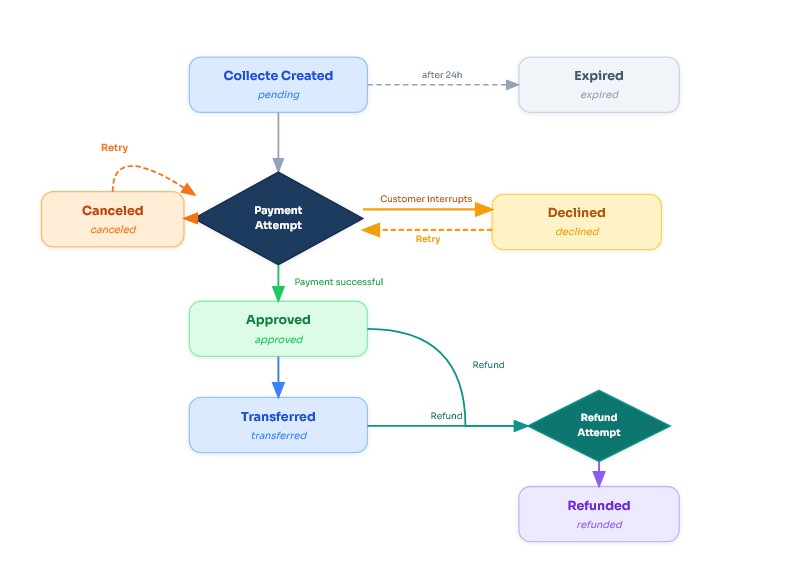
The diagram above illustrates the complete lifecycle of a Collecte, from creation to its final status.
Each collection passes through various statuses:
* **pending** : Pending (default status upon creation)
* **approved** : Approved (successful payment)
* **declined** : Declined (voluntary or accidental interruption by the customer)
* **canceled** : Canceled (insufficient funds or other payment issues)
* **refunded** : Refunded (amount reversed to the customer)
* **transferred** : Transferred (amount moved to the merchant account)
* **expired** : Expired (the collect was not completed within the allowed time frame)
The **canceled** and **declined** statuses are not final statuses a new payment attempt can be made. A **pending** collecte that is not completed automatically expires after 24 hours. A **refund** can be initiated from **approved** or **transferred** via a refund attempt.
To view the real-time status, visit the FedaPay dashboard under the **Collects** section or use the API to check using the collect ID.
### Add Custom Data to Your FedaPay Transactions: merchant\_reference and custom\_metadata
When you create a transaction through the FedaPay API, it's often helpful to attach some custom information that comes from your own app or platform. This could be to track the transaction better, connect it to a user account, an order, or a specific business operation.
To make this easier, FedaPay offers two key fields you can use: **merchant\_reference** and **custom\_metadata.**
**Merchant\_reference: Your Own Unique ID for Each Transaction**
The **merchant\_reference** field lets you assign your own identifier to a transaction — for example, an order number, an invoice code, or a session ID from your platform. This reference is stored on FedaPay’s side and can later be used to easily retrieve that transaction.
**Why Use It?**
* You run an e-commerce site or mobile app and want to match each FedaPay transaction to an internal payment or order.
* You want to search and filter transactions using your own identifiers, without relying on FedaPay’s generated transaction ID.
* You need better visibility and tracking of client payments for internal tools or reports.
**Example: Creating a Transaction with merchant\_reference**
```java Curl theme={null}
curl -X POST \
https://sandbox-api.fedapay.com/v1/transactions \
-H 'Authorization: Bearer TOKEN' \
-H 'Content-Type: application/json' \
-d '{
"description" : "Transaction for john.doe@example.com",
"amount" : 2000,
"currency" : {"iso" : "XOF"},
"callback_url" : "https://maplateforme.com/callback",
"customer" : {
"email" : "john.doe@example.com",
},
"merchant_reference": "CMD-20250701-001"
}'
```
```javascript NodeJs theme={null}
const { FedaPay, Transaction } = require('fedapay');
// Configure the API key and environment
FedaPay.setApiKey('YOUR_SECRET_API_KEY');
FedaPay.setEnvironment('sandbox'); // or 'live'
// Create a transaction with merchant_reference and custom_metadata
const transaction = await Transaction.create({
description: 'Transaction for john.doe@example.com',
amount: 2000,
currency: { iso: 'XOF' },
callback_url: 'https://maplateforme.com/callback',
customer: {
email: 'john.doe@example.com'
},
merchant_reference: 'CMD-20250701-001',
custom_metadata: {
order_type: 'online',
promo_code: 'SUMMER2025'
}
});
console.log('Transaction created:', transaction.id);
```
```php PHP theme={null}
$transaction = \FedaPay\Transaction::create([
"description" => "Transaction for john.doe@example.com",
"amount" => 2000,
"currency" => ["iso" => "XOF"],
"callback_url" => "https://maplateforme.com/callback",
"customer" => [
"email" => "john.doe@example.com"
],
"merchant_reference" => "CMD-20250701-001",
"custom_metadata" => [
"order_type" => "online",
"promo_code" => "SUMMER2025"
]
]);
echo "Transaction created: " . $transaction->id;
```
```Ruby Ruby theme={null}
require 'fedapay'
# Configure the API key and environment
FedaPay.api_key = 'YOUR_SECRET_API_KEY'
FedaPay.environment = 'sandbox' # or 'live'
# Create a transaction with merchant_reference and custom_metadata
transaction = FedaPay::Transaction.create(
description: 'Transaction for john.doe@example.com',
amount: 2000,
currency: { iso: 'XOF' },
callback_url: 'https://maplateforme.com/callback',
customer: { email: 'john.doe@example.com' },
merchant_reference: 'CMD-20250701-001',
custom_metadata: {
order_type: 'online',
promo_code: 'SUMMER2025'
}
)
puts "Transaction created: #{transaction.id}"
```
Here, ORD-20250701-001 is the merchant’s own code for this specific transaction.
**Retrieving a Transaction by Merchant Reference**
```java Curl theme={null}
curl -X GET \
https://sandbox-api.fedapay.com/v1/transactions/merchant/{reference}
\
-H 'Authorization: Bearer VOTRE_CLE_API_SECRETE' \
-H 'Content-Type: application/json'
```
```javascript NodeJs theme={null}
const { FedaPay, Transaction } = require('fedapay');
/* Replace YOUR_SECRET_API_KEY with your real API key */
FedaPay.setApiKey("YOUR_SECRET_API_KEY");
/* Specify whether you want to run your query in test or live mode */
FedaPay.setEnvironment('sandbox'); // or 'live'
/* Merchant reference to search */
const reference = 'CMD-20250701-001';
/* Retrieve transaction by merchant reference */
const transaction = await Transaction.retrieveByMerchantReference(reference);
console.log("Transaction found:", transaction.id);
```
```php PHP theme={null}
$merchant_reference = 'CMD-20250701-001';
$transaction = \FedaPay\Transaction::retrieveByMerchantReference($merchant_reference);
echo "Transaction found: " . $transaction->id;
```
```Ruby Ruby theme={null}
require 'fedapay'
FedaPay.api_key = 'YOUR_SECRET_API_KEY'
FedaPay.environment = 'sandbox' # or 'live'
reference = 'CMD-20250701-001'
transaction = FedaPay::Transaction.retrieve_by_merchant_reference(reference)
puts "Transaction found: #{transaction.id}"
```
**custom\_metadata: Add Extra Info to a Transaction**
With the **custom\_metadata** field, you can attach additional data to your transaction. These are key-value pairs that can hold any info useful for your business without impacting how the payment is processed.
**Use Cases Include:**
* Order ID or user ID
* Type of service or subscription purchased
* Sales agent or partner involved
* Anything else that helps you with automation or reporting
**Why Use It?**
* Makes it easier to automate back-office tasks (e.g., reconciliation, reporting, alerts).
* Avoids having to store sensitive or dynamic data in your own systems.
* Saves time when reviewing or validating transactions manually.
**Example: Creating a Transaction with custom\_metadata**
```java Curl theme={null}
curl -X POST https://sandbox-api.fedapay.com/v1/transactions \
-H 'Authorization: Bearer TOKEN' \
-H 'Content-Type: application/json' \
-d '{
"description": "Abonnement premium",
"amount": 10000,
"currency": {"iso": "XOF"},
"callback_url": "https://votreapp.com/callback",
"customer": {
"email": "utilisateur@votreapp.com"
},
"custom_metadata": {
"client_id": "USER-14567",
"forfait": "premium",
"langue": "fr"
}
}'
```
```javascript NodeJs theme={null}
const { FedaPay, Transaction } = require('fedapay');
/* Replace YOUR_SECRET_API_KEY with your real API key */
FedaPay.setApiKey("YOUR_SECRET_API_KEY");
/* Specify whether you want to run your query in test or live mode */
FedaPay.setEnvironment('sandbox'); // or 'live'
/* Create a transaction with custom_metadata */
const transaction = await Transaction.create({
description: "Abonnement premium",
amount: 10000,
currency: { iso: "XOF" },
callback_url: "https://votreapp.com/callback",
customer: {
email: "utilisateur@votreapp.com"
},
custom_metadata: {
client_id: "USER-14567",
forfait: "premium",
langue: "fr"
}
});
console.log("Transaction created:", transaction.id);
```
```php PHP theme={null}
// Configurer la clé API et l'environnement
\FedaPay\FedaPay::setApiKey('YOUR_SECRET_API_KEY');
\FedaPay\FedaPay::setEnvironment('sandbox'); // ou 'live'
// Créer une transaction avec custom_metadata
$transaction = \FedaPay\Transaction::create([
"description" => "Abonnement premium",
"amount" => 10000,
"currency" => ["iso" => "XOF"],
"callback_url" => "https://votreapp.com/callback",
"customer" => [
"email" => "utilisateur@votreapp.com"
],
"custom_metadata" => [
"client_id" => "USER-14567",
"forfait" => "premium",
"langue" => "fr"
]
]);
echo "Transaction created: " . $transaction->id;
```
```Ruby Ruby theme={null}
require 'fedapay'
FedaPay.api_key = 'YOUR_SECRET_API_KEY'
FedaPay.environment = 'sandbox' # or 'live'
transaction = FedaPay::Transaction.create(
description: 'Abonnement premium',
amount: 10000,
currency: { iso: 'XOF' },
callback_url: 'https://votreapp.com/callback',
customer: {
email: 'utilisateur@votreapp.com'
},
custom_metadata: {
client_id: 'USER-14567',
forfait: 'premium',
langue: 'fr'
}
)
puts "Transaction created: #{transaction.id}"
```
**Best Practices** :
* Make sure your merchant\_reference is unique for every transaction. If it's duplicated, the transaction will fail.
* Only use custom\_metadata for non-sensitive data. Don’t store passwords, card numbers, or personal details in this field.
* Both fields are optional, but they’re powerful tools for improving how your system interacts with FedaPay and how you handle payment workflows internally.