> ## Documentation Index
> Fetch the complete documentation index at: https://docs.fedapay.com/llms.txt
> Use this file to discover all available pages before exploring further.
# Retrieving and managing your FedaPay funds
This section guides you through the process of withdrawing available funds, currency rules, and managing your payout requests through FedaPay. Here’s how to access your funds and request a payout, step by step.
#### Access Available Funds
On FedaPay, all transactions marked as **“transferred”** become available in your FedaPay balance depending on the payment method used (Mobile Money, bank card, etc.).
**1. Add a bank account or a Mobile Money number**
* Add a bank account: [Follow this guide](https://docs.fedapay.com/dashboard/en/business-en#bank-accounts)
* Add a Mobile Money number: [Follow this guide](https://docs.fedapay.com/dashboard/en/business-en#mobile-money-accounts)
Once your withdrawal method is added, you can initiate a withdrawal.
**2. Make a withdrawal from your balance**
* Log in to your FedaPay dashboard.
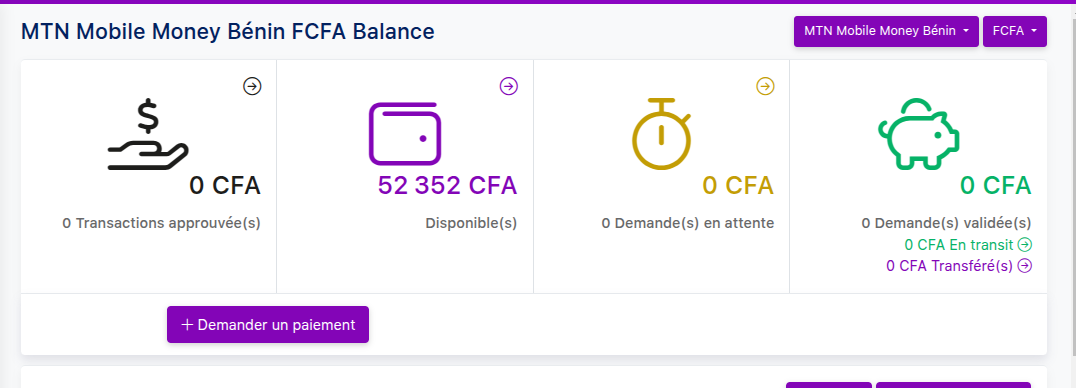
* Go to “Balance” to view available funds.
* Select the payment method and currency.
* Click “Request a payment”.
* Complete the form with the following details:
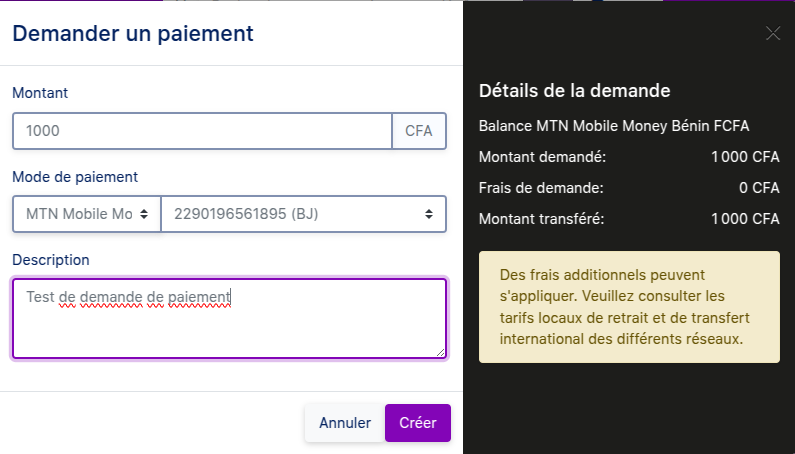
* ✅ Amount (between 1,000 and 500,000 XOF)
* ✅ Payment method (Mobile Money or bank account)
* ✅ Withdrawal description (optional)
* Click “Create” to submit the request.

**Important information**
* Each balance is independent → You cannot combine multiple payment methods into a single withdrawal.
* Bank card payments are not yet available for withdrawals.
* A 72-hour waiting period is required before an approved transaction is transferred to your balance.
### Additional information on FedaPay withdrawals
Once you have added and verified a **Mobile Money number** or a **bank account** to your FedaPay account, you can initiate withdrawals.
**Security check during the first withdrawal:**
* If you initiate a withdrawal **within 10 days following the verification** of your withdrawal method, you will receive a **confirmation email** to validate that the operation was indeed initiated by you.
* If the withdrawal is initiated **after 10 days**, you will not receive any additional confirmation email.
**Conditions for bank transfer withdrawals:**
* The withdrawal amount must be **greater than or equal to 53,500 XOF**.
* If the amount is below this threshold, **the operation will automatically fail**.
⚠️ **Best practices:**
* Always make sure that your withdrawal information (Mobile Money number or bank account details) is correctly entered and up to date.
* Plan your withdrawals taking into account the verification timelines and the limits imposed by banks or Mobile Money operators.
#### Managing Multi-Currency Balances
FedaPay creates a separate balance for each currency used in your transactions (e.g., one for Euro transactions and another for CFA Franc transactions). This means it’s impossible to merge funds from multiple balances for a single transfer request.
**Important Note**: Although you cannot merge funds from different currencies for a transfer, you can receive all transfers into a single bank account regardless of the currency, and your bank will handle the necessary conversion.
#### Tracking Payment Requests
After submitting your payment request, you can track its status in the Payment Requests section of your dashboard. You can filter your requests by :
* Request ID
* Amount
* Status
* Description
* Creation Date
* Approval Date
There’s also an Export to CSV button to download the history of payment requests as a file.
#### Withdrawal Procedure
Follow these steps to withdraw your funds:
Go to your balance in the currency corresponding to your withdrawal request (e.g., Euro or CFA Franc).
From your dashboard, submit a transfer request to the associated bank account or Mobile Money.
FedaPay will review the request and validate the withdrawal, provided there are no transaction disputes from the previous week.
Once approved, the request will be processed, and the transfer will be made to the specified account or wallet.
**Key Details to Remember:**
* All transactions marked as **Transferred** are available in your merchant account balance.
* Approved transactions require 72 hours to be transferred to your balance.
* Transfers can be made to a bank account, Mobile Money.
## Currently Supported Currencies
At present, FedaPay only supports CFA Franc (XOF) for transactions. Additional currencies will be added progressively. If you need a specific currency not currently available, please contact FedaPay to request it.
**Supported Currencies**
XOF, GNF
952, 324
CFA Franc (UEMOA), Guinean Franc
African Financial Community BCEAO, Guinea