> ## Documentation Index
> Fetch the complete documentation index at: https://docs.fedapay.com/llms.txt
> Use this file to discover all available pages before exploring further.
# Collects: Viewing and Management
The **Collects section** allows you to **view, organize, and manage** all your transactions in real time.
### Overview of Collects
Collects are automatically classified into three categories:
* **All**: all recorded transactions
* **Successful**: collects completed successfully
* **Pending**: collects created but not yet paid
### Create a New Collect
To manually record a transaction:
1- Click on "**Add a Collect**."
2- Fill in the required fields:
* **Client** (select from registered clients)
* **Amount to collect**
* **Currency**
* **Description** (optional)
3- Click "**Add**" to confirm.
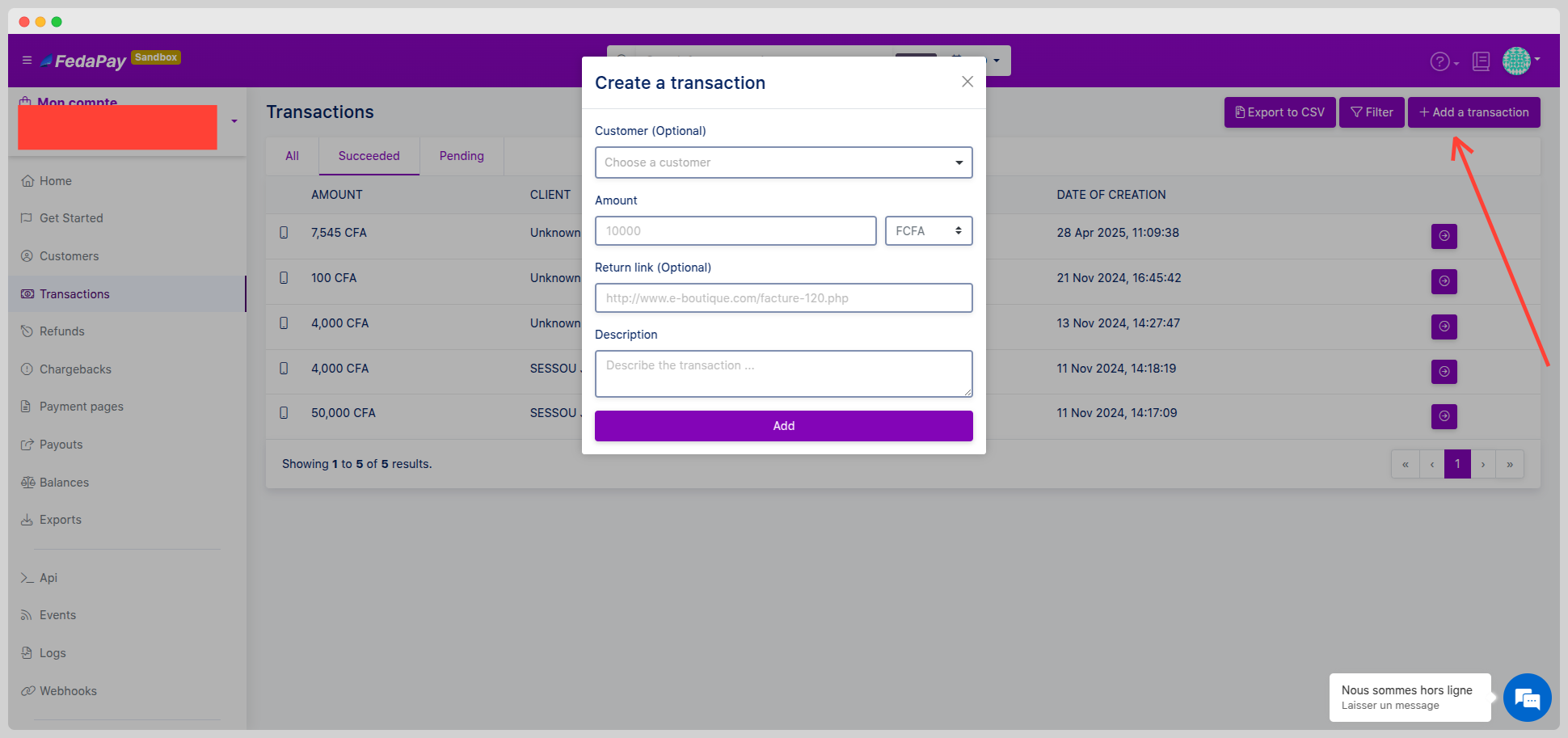 Once added, the collect appears with the “**Pending**” status.
You can then **generate a payment link** for this collect and send it to the client: [How to generate a payment link](https://support.fedapay.com/portal/en/kb/articles/comment-g%C3%A9n%C3%A9rer-un-lien-de-paiement)
### View Existing Collects
To access your recorded transactions:
1- Click on “**Collects**” in the main menu.
2- A list of all collects is displayed, showing:
* **Amount**
* **Client’s name**
* **Status**
* **Creation date**
A quick overview lets you identify collects to follow up on or analyze.
**Edit or Delete a Collect**
For a **pending collect**, you can:
* Click “**Edit details**” to adjust fields (amount, description, etc.)
* Click “**Delete**” to remove it permanently
Once added, the collect appears with the “**Pending**” status.
You can then **generate a payment link** for this collect and send it to the client: [How to generate a payment link](https://support.fedapay.com/portal/en/kb/articles/comment-g%C3%A9n%C3%A9rer-un-lien-de-paiement)
### View Existing Collects
To access your recorded transactions:
1- Click on “**Collects**” in the main menu.
2- A list of all collects is displayed, showing:
* **Amount**
* **Client’s name**
* **Status**
* **Creation date**
A quick overview lets you identify collects to follow up on or analyze.
**Edit or Delete a Collect**
For a **pending collect**, you can:
* Click “**Edit details**” to adjust fields (amount, description, etc.)
* Click “**Delete**” to remove it permanently
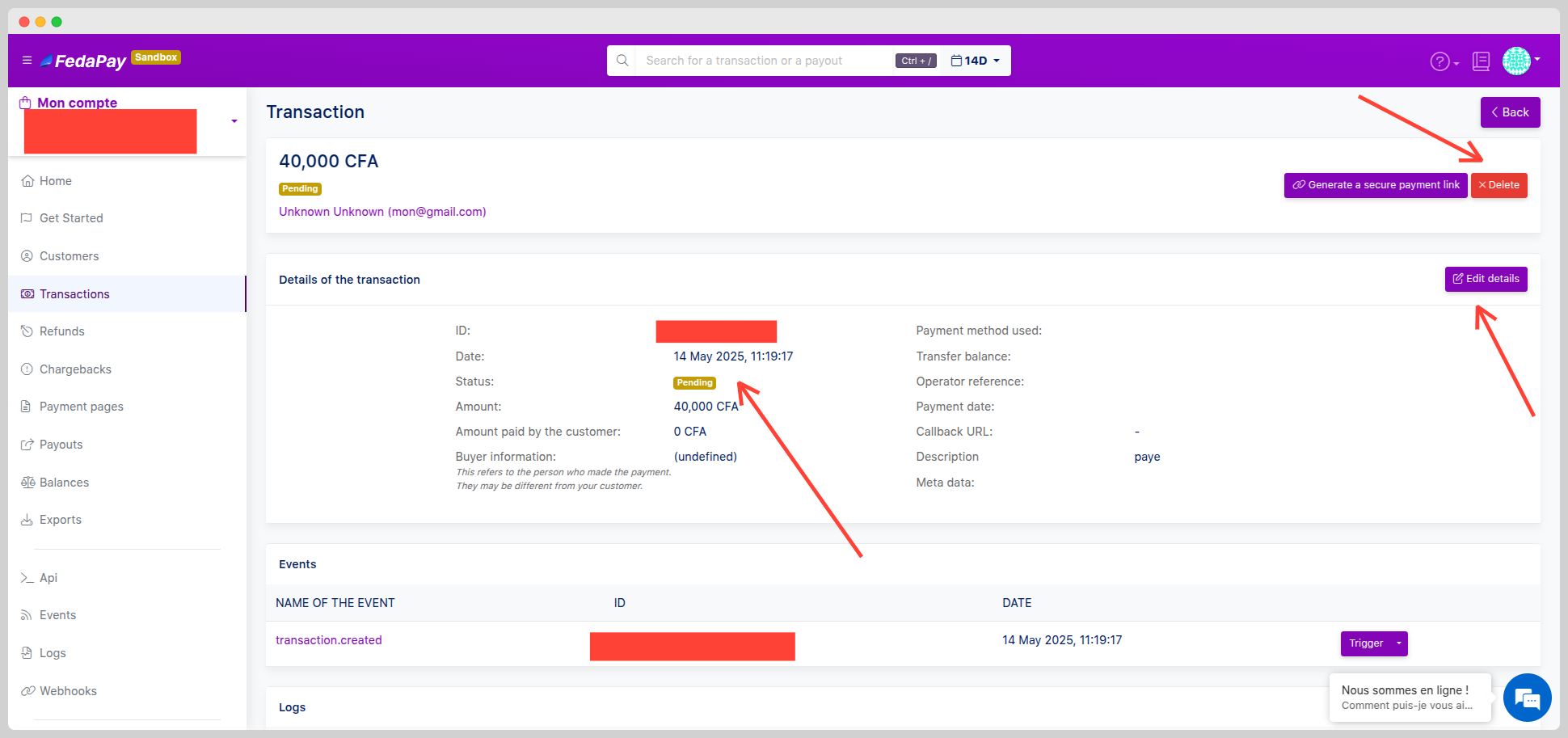 Once a collect is **paid or failed**, it can no longer be modified.
### Filters and Export
Use smart filters to sort your collects by:
* **ID**
* **Reference**
* **Amount**
* **Status**
* **Payment method**
You can also **export your collects** in **CSV format** for accounting use or analysis in Excel.
**Key Takeaways**
* Create and manage your collects manually or automatically.
* Monitor the progress of your transactions in real time.
* Customize your analysis using **filters** and **CSV** exports.
Once a collect is **paid or failed**, it can no longer be modified.
### Filters and Export
Use smart filters to sort your collects by:
* **ID**
* **Reference**
* **Amount**
* **Status**
* **Payment method**
You can also **export your collects** in **CSV format** for accounting use or analysis in Excel.
**Key Takeaways**
* Create and manage your collects manually or automatically.
* Monitor the progress of your transactions in real time.
* Customize your analysis using **filters** and **CSV** exports.